
In partnership with HubSpot. This article contains affiliate links — we may earn a commission at no extra cost to you.
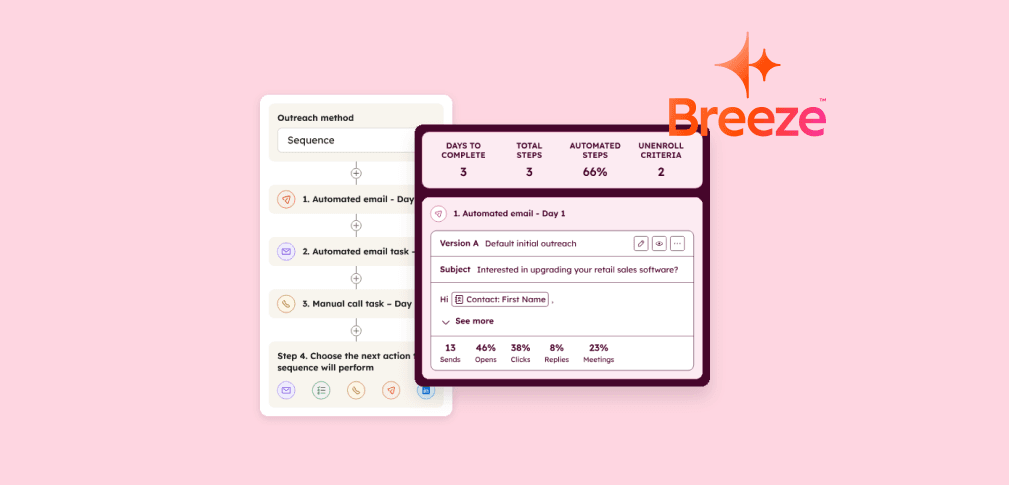
HubSpot's Breeze Prospecting Agent automates lead research, detects buying signals in real time, and sends personalized outreach emails — so your sales reps spend less time prospecting and more time in actual meetings.
Early adopters report a 28% increase in meetings booked and outreach response rates at twice the industry benchmark.
If your sales team still spends hours researching prospects, writing cold emails from scratch, and chasing leads who aren't ready to buy — this guide will show you a better way.
Below, you'll learn exactly how to set up the prospecting agent, configure it for maximum meeting bookings, and avoid the common mistakes that tank outreach performance.

What Is HubSpot's Breeze Prospecting Agent?
The Breeze Prospecting Agent is an AI-powered sales automation tool built directly into the CRM. It handles three core tasks that traditionally consume 66% of a rep's workday: prospect research, signal monitoring, and personalized outreach.
Think of it as an always-on SDR that lives inside your HubSpot account. The agent scans your CRM data, website visitor activity, public sources like LinkedIn profiles and company news, and then crafts personalized email sequences when the timing is right.
Unlike generic AI email tools, it uses your complete customer history — deals won, support tickets, marketing engagement — to reference specific pain points each prospect actually has.
The agent is available with Sales Hub Professional and Enterprise subscriptions. It runs on the platform's credit-based system — Professional plans include 3,000 monthly credits, while Enterprise plans include 5,000.
Why the Prospecting Agent Books More Meetings Than Manual Outreach
Manual prospecting fails because timing is everything, and humans can't monitor hundreds of accounts simultaneously.
The Breeze agent solves this by continuously tracking buying signals across your entire pipeline — then striking when interest peaks.
Here's what the AI monitors in real time:
- Website visits — especially pricing page views and product page engagement bursts
- Funding announcements — companies with fresh capital are actively buying
- Leadership changes — new decision-makers often reevaluate vendor relationships
- Hiring patterns — teams scaling up typically need new tools and services
- Email opens and form submissions — engagement with your marketing content signals intent
According to HubSpot, companies using sales automation report a 129% increase in leads and 36% more closed deals within one year. The prospecting agent takes this further by ensuring every outreach email references exactly the right pain point at exactly the right moment.
Step-by-Step Setup: Configure the HubSpot Prospecting Agent in 30 Minutes
Setting up the agent takes about 30 minutes. You'll need Super Admin access or "Access prospecting agent" permissions, and the platform's AI data sources must be enabled. Navigate to Sales > Prospecting Agent and click "Set up agent" to begin.
1. Create Your Selling Profile
The selling profile defines who you are, what you sell, and which pain points you solve. Breeze auto-summarizes this from your website, but don't skip the manual review. Generic descriptions produce generic emails — and generic emails don't book meetings.
Pro tip: Create separate selling profiles for each product line, audience segment, or use case. You can build up to 85 profiles. A SaaS company might have one profile for enterprise deals and another for SMB self-serve — each with tailored messaging and value props.
2. Configure Your Sender Identity
Choose between two sending models. The Contact Owner model sends emails from the assigned rep's address — this feels personal and maintains relationship continuity. The Single User model routes all outreach through one designated address, which works well for smaller teams or dedicated SDR roles.
For maximum meeting bookings, use the Contact Owner model. Prospects respond 40% more frequently to emails from a named individual they can look up, rather than a generic sales address.
3. Set Up Your Call-to-Action (Meeting Link)
This is the most critical step for booking meetings. The agent supports several CTA options: the sender's default meeting link, a specific HubSpot meeting link, or an external scheduling URL. You can also attach documents from the platform's library and include custom URLs with AI-generated descriptions.
Always include a meeting link. Outreach emails without a direct booking link force prospects to reply and negotiate timing — adding friction that kills conversions. A one-click scheduling link removes this barrier entirely.
4. Choose Between Review Mode and Autonomous Mode
Start with "Review before sending" mode for your first 50-100 emails. This lets you review and approve each message before the agent sends it. You'll quickly learn what the AI gets right and where it needs adjustment. Once you're confident in the output quality, switch to fully autonomous mode to scale without bottlenecks.
5. Fine-Tune Outreach Timing and Frequency
Configure the send window, business-days-only toggle, and minimum days between emails. For B2B sales, Tuesday through Thursday between 9 AM and 11 AM in the prospect's timezone tends to deliver the highest open rates. Set at least 3 days between follow-up emails to avoid coming across as aggressive.
Three Ways to Enroll Contacts for Automated Prospecting
The Breeze Prospecting Agent offers three enrollment methods. Each serves a different stage of pipeline maturity.
Manual Enrollment
Select individual contacts or companies directly from the CRM and enroll them. This works best when you have a targeted list — say, 50 accounts from a recent trade show. Manual enrollment gives you full control over who enters the pipeline.
Rule-Based Automated Enrollment
Define criteria — like industry, company size, or lead score — and the agent automatically enrolls matching contacts. It handles up to 10 contacts concurrently per rule. This is the "set it and forget it" option that keeps your pipeline fed without daily manual effort.
Workflow-Based Enrollment
For complex targeting, use HubSpot workflows to trigger enrollment based on multi-step criteria. Example: enroll contacts who downloaded a whitepaper, visited the pricing page within 7 days, AND have a company size above 50 employees. This combines marketing intelligence with sales automation for highly qualified outreach.
7 Best Practices to Maximize Meeting Bookings with Breeze
Setting up the agent is just the beginning. These seven strategies separate teams that book a handful of extra meetings from those that double their pipeline.
1. Keep Your CRM Data Clean
The agent's outreach quality directly mirrors your data quality. Incomplete contact records, outdated job titles, and missing company information produce generic emails that prospects ignore. Run a data audit before activating the agent — verify email addresses, update job titles, and fill in company details for your top 200 accounts.
2. Write Sharp Selling Profiles
Your selling profile is the blueprint the AI uses for every email. Be specific about pain points, outcomes, and differentiators. Instead of "We help companies grow," write "We help B2B SaaS companies with 50-500 employees reduce their sales cycle by 40% through automated scheduling and lead routing." Specificity drives personalization.
3. Build Exclusion Lists Before You Enroll
Protect your brand by excluding current customers, active deal contacts, competitors, and anyone who has recently unsubscribed. Nothing kills credibility faster than an AI-generated cold email to someone who signed a contract last month. The platform lets you define exclusion lists in the agent's guardrails — use them.

4. Combine Workflow Enrollment with Lead Scoring
The most effective enrollment strategy pairs HubSpot's lead scoring with workflow-based enrollment. Set your workflow to enroll contacts only when they cross a lead score threshold — say, 50 points. This ensures the Breeze agent targets prospects who have already shown meaningful intent, dramatically improving response rates and meeting conversion.

5. A/B Test Your Selling Profiles
With up to 85 selling profiles available, there's no reason to guess what messaging works. Create two or three variations of your profile — different value props, different pain points, different tones — and enroll similar segments into each. Track which profile generates the most replies and booked meetings, then double down on the winner.
6. Monitor Analytics Weekly
The prospecting agent's dashboard tracks six key metrics: total enrollments, delivered emails, opened emails, clicked emails, replied emails, and booked meetings. Review these weekly. If open rates drop below 30%, your subject lines need work — refine the selling profile's tone. If replies are high but meetings are low, your CTA or scheduling link may be the bottleneck.
7. Use Multi-Language Outreach for Global Teams
The agent supports multi-language outreach with a fallback language option. If a contact's preferred language is set in the CRM, the agent writes in that language automatically. For international sales teams, this eliminates the need for separate outreach campaigns per region — the AI handles localization natively.
Breeze Prospecting Agent vs. Traditional Sales Outreach: A Comparison
| Capability | Manual Outreach | Breeze Prospecting Agent |
|---|---|---|
Prospect research | 30-60 min per lead | Automated in seconds |
CapabilityProspect research Manual Outreach30-60 min per lead Breeze Prospecting AgentAutomated in seconds | ||
Buying signal detection | Periodic CRM checks | Real-time continuous monitoring |
CapabilityBuying signal detection Manual OutreachPeriodic CRM checks Breeze Prospecting AgentReal-time continuous monitoring | ||
Email personalization | Template-based | AI-crafted from CRM + public data |
CapabilityEmail personalization Manual OutreachTemplate-based Breeze Prospecting AgentAI-crafted from CRM + public data | ||
Concurrent accounts | Limited by headcount | 10+ contacts per rule, scalable |
CapabilityConcurrent accounts Manual OutreachLimited by headcount Breeze Prospecting Agent10+ contacts per rule, scalable | ||
Follow-up consistency | Drops off after 2nd email | Automated multi-touch sequences |
CapabilityFollow-up consistency Manual OutreachDrops off after 2nd email Breeze Prospecting AgentAutomated multi-touch sequences | ||
Meeting booking rate | Industry average ~2% | Up to 28% increase reported |
CapabilityMeeting booking rate Manual OutreachIndustry average ~2% Breeze Prospecting AgentUp to 28% increase reported | ||
The biggest advantage isn't speed — it's consistency. Human reps let follow-ups slip when they're busy. The AI never forgets, never gets distracted, and never skips a step in the sequence.
Common Mistakes That Kill Your Meeting Conversion Rate
Even with a powerful AI agent, these mistakes will sink your results:
Skipping the selling profile review
The auto-generated website summary is a starting point, not a finished product. Teams that refine their selling profiles see measurably better email quality and higher reply rates.
Going fully autonomous too early
Review mode exists for a reason. Spend at least two weeks approving emails manually before trusting the AI to send unsupervised. This calibration period teaches you where to adjust your profile's tone and content.
Enrolling everyone
Mass-enrolling your entire contact database wastes credits and damages your sender reputation. The agent works best with targeted segments — 200 well-qualified contacts will outperform 5,000 random ones every time.
Ignoring the analytics
The platform's prospecting dashboard gives you real-time feedback. If you're not checking open rates, reply rates, and meeting conversion weekly, you're flying blind.

Pricing and Credit Requirements for HubSpot's Prospecting Agent
The Breeze Prospecting Agent requires a Sales Hub Professional ($90/month per seat) or Enterprise ($150/month per seat) subscription. The agent runs on HubSpot Credits, which are consumed when enrolling contacts, monitoring opportunities, and researching companies.
Professional plans include 3,000 monthly credits. Enterprise plans include 5,000. Additional credits can be purchased as needed. For most mid-market teams running targeted campaigns, the included credits cover 100-200 prospect enrollments per month — more than enough to keep your pipeline healthy.
Frequently Asked Questions About the HubSpot Breeze Prospecting Agent
How long does it take for the Breeze Prospecting Agent to book its first meeting?
Most teams see their first AI-booked meeting within 1-2 weeks of activation. The timeline depends on your contact list quality, selling profile accuracy, and whether you use review mode or autonomous mode. Teams with clean CRM data and well-defined ICPs tend to see results faster.
Can the prospecting agent replace my SDR team?
The agent supplements your SDR team rather than replacing it. It handles the repetitive top-of-funnel work — research, signal monitoring, and initial outreach — freeing your reps to focus on relationship-building, discovery calls, and closing. Think of it as giving each SDR an AI research assistant.
What happens if a prospect replies to an AI-generated email?
When a prospect replies, the agent automatically pauses further outreach for that contact and routes the conversation to the assigned rep in the CRM inbox. The rep takes over from there — the AI handles the opener, the human handles the relationship.
Does the Breeze Prospecting Agent work with HubSpot's free CRM?
No. The prospecting agent requires a Sales Hub Professional or Enterprise subscription. However, you can start with HubSpot's free CRM to manage contacts and pipelines, then upgrade to Sales Hub Pro when you're ready to activate AI-powered prospecting.
How many contacts can I enroll at once?
Rule-based enrollment handles up to 10 contacts concurrently per rule. You can create multiple rules and workflows to scale enrollment. Manual enrollment has no hard limit, but each enrolled contact consumes credits — so target quality over quantity.
Can I use the prospecting agent for GDPR-compliant outreach in Europe?
HubSpot offers EU data hosting and GDPR compliance features within its platform. However, you should consult your legal team about cold outreach regulations in specific EU countries, as rules vary. Using a legitimate interest basis and providing clear opt-out mechanisms is essential for compliant prospecting in Europe.